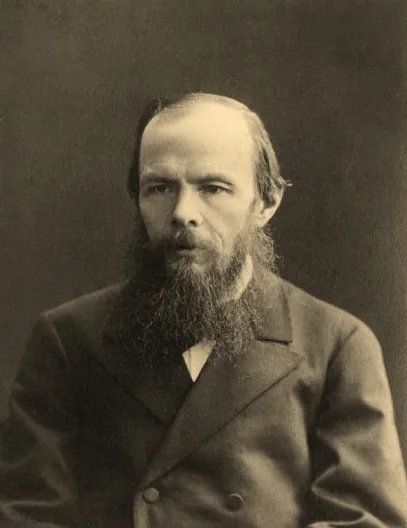
Example: an 1879 portrait
For the example we took a photograph of Fyodor Dostoevsky from 1879 (photographer Konstantin Shapiro). The picture is in the public domain.
The result in two passes: restoration first, then colorization.
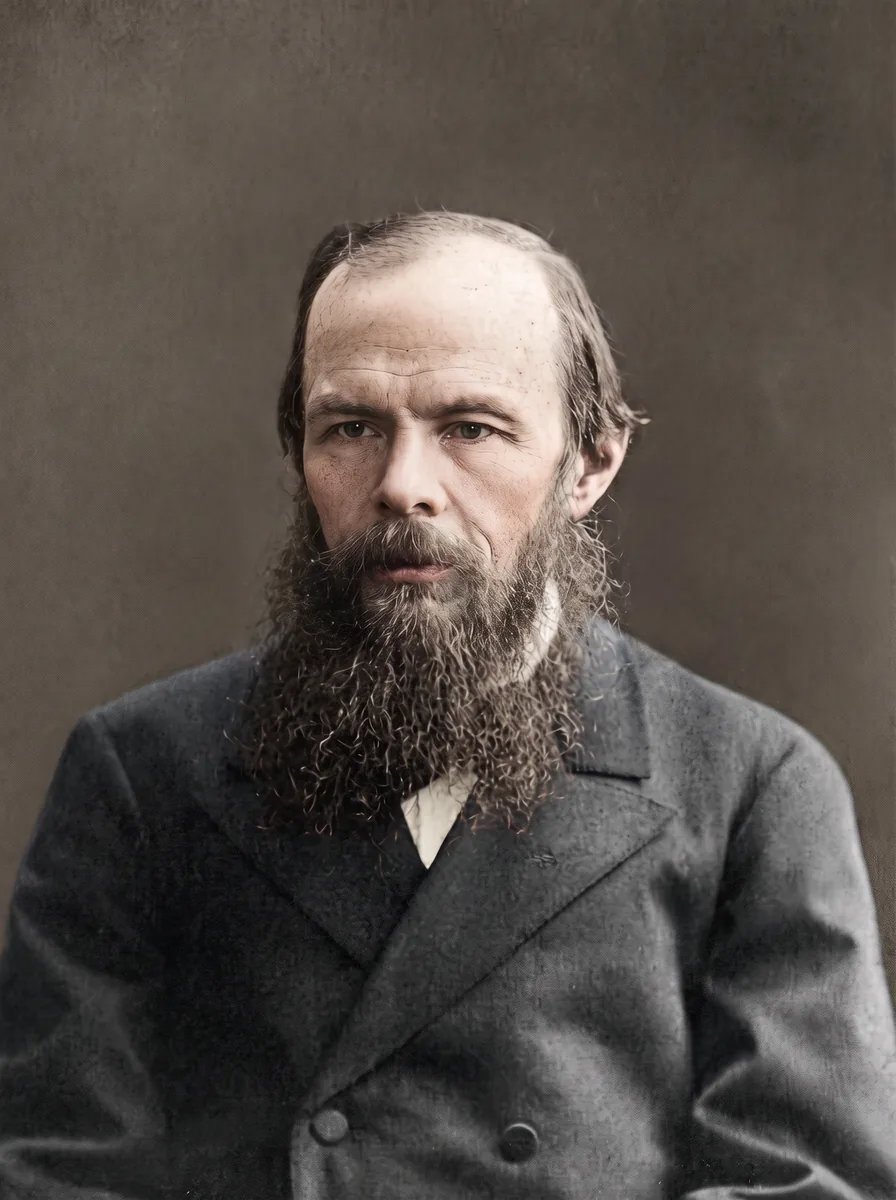
The wrinkles, the skin texture, the shape of the beard and the gaze survived, that is, everything that makes the picture authentic.
Why two passes and not one
We also tested the «all at once» option: colorization with a single prompt directly on the original.
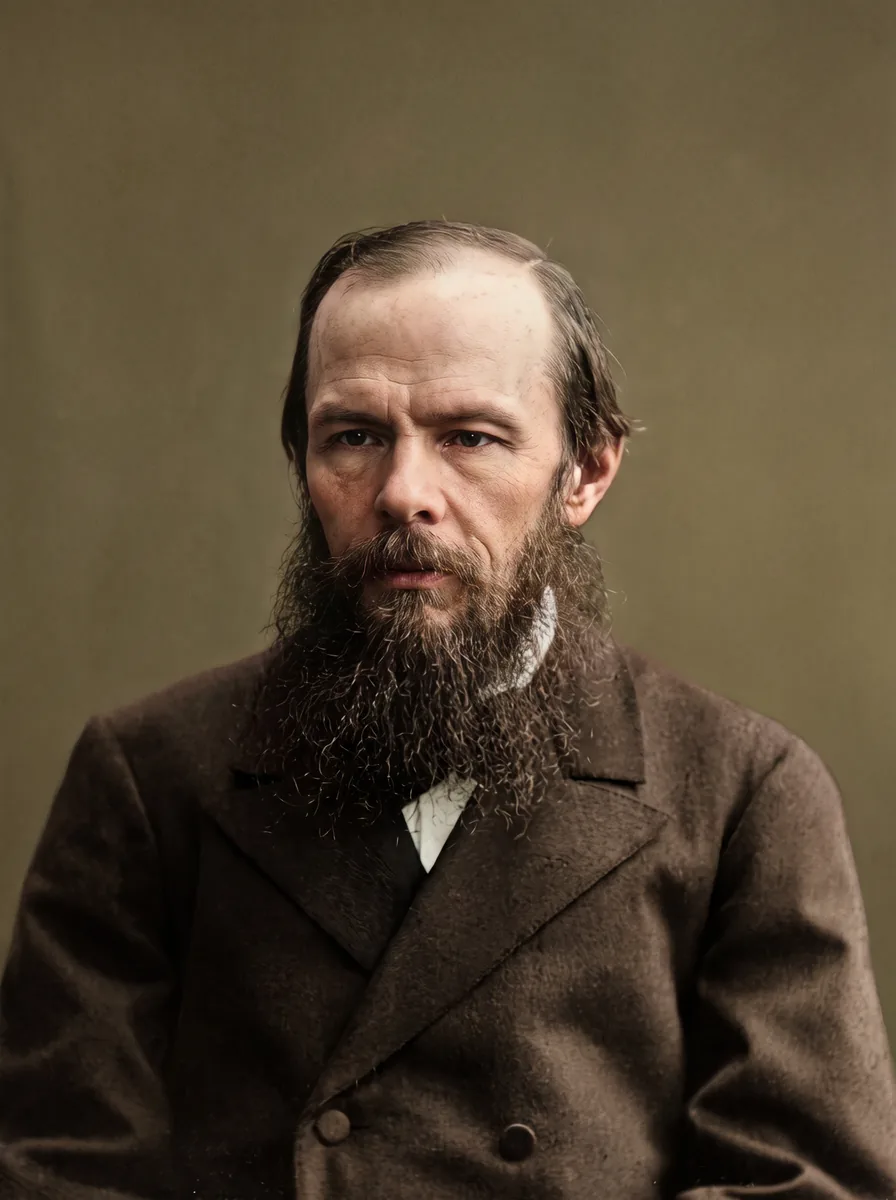
It came out more striking, almost like a modern portrait. But the model invented more: the skin is smoother, the face looks «fresher», and the colour of the frock coat it simply chose itself. Next to the original you can see that the person looks younger.
Rule: one task per pass. Restoration first, then colour. That way it is easier to see at which step something went wrong, and the face «drifts» less.
Step 1. Restoration
Model: Nano Banana Pro, 2K, same format as the original.
Restore this old photograph. Remove scratches, dust, creases, stains and small tears, reduce noise and gently sharpen. Keep every face, expression, age, hairstyle, beard, clothing, pose, composition and framing exactly as in the original. Do not beautify, do not smooth skin, do not add or remove any objects or people. Keep it black and white with natural film grain.
The key parts of the prompt: what to keep (faces, age, clothing, composition) and the ban on «beautifying». Without them the model happily makes the skin smooth and removes wrinkles.
Step 2. Colorization
Upload the result of the first step, not the original.
Colorize this black and white photograph with realistic, muted, period-appropriate colors: natural skin tones, believable fabric colors, natural colors of the background. Change only the colors. Keep all faces, features, expressions, details, lighting and composition exactly the same. No oversaturation. Keep skin tones neutral and natural, avoid pink or red color cast in the skin and hair.
The last sentence removes a common problem: a pinkish skin tone and reddish hair.
A torn photo
This photo is torn and has a missing corner. Reconstruct only the damaged areas so they blend naturally with the surrounding image. Do not change faces or any undamaged part of the photo.
If a piece with a face is torn off, the model will invent it. That is no longer restoration but drawing in, and there may be no likeness to the real person.
What to check
- Face: features, age and expression are the same as in the original.
- Skin: wrinkles and texture are in place, no «plastic».
- Details: no new objects, jewellery or buttons have appeared.
- Colours: calm, without acid tones.
If the face has changed, do not keep editing the result: go back to the original and repeat with an emphasis on «keep the face identical».
Tips on the source
- Scan, do not photograph under glass: the model will take glare for details.
- Use the largest scan.
- Keep the original separately.
- If the photo shows relatives, ask the living ones for consent before posting on social media.
What next: animate the photo
A restored photo can be animated: the person will blink, turn their head, smile. How to do it: how to animate a photo with AI. For a holiday greeting: AI video greeting.
How much it costs
| What | Passes | Approximately |
|---|---|---|
| Restoration, 2K | 1 | ~25 rubles |
| Restoration and colorization, 2K | 2 | ~50 rubles |
| The same for print, 4K | 2 | ~88 rubles |
Prices on KADR, October 2026. This is not a public offer.
In short
An old photo is restored with AI in two passes: first restoration with a ban on changing faces and «beautifying» the skin, then colorization with muted period colours. One pass is more striking, but the model invents more. On Nano Banana Pro this costs about 50 rubles per photo.