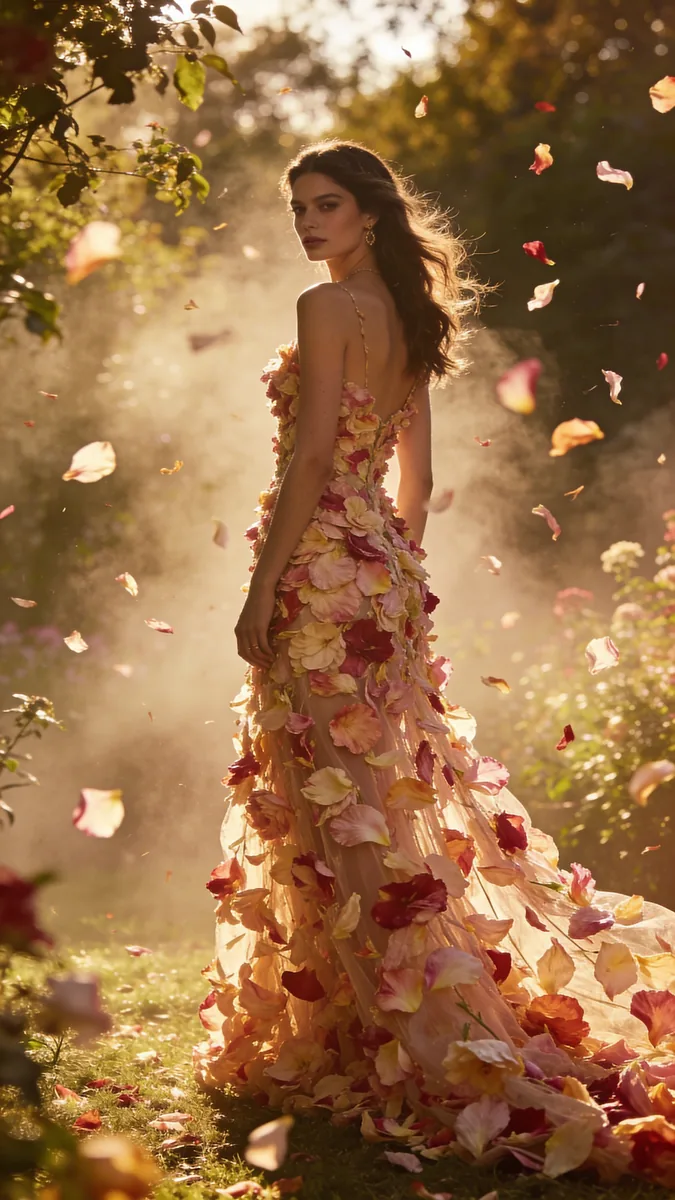
Example
Source: a girl in a petal dress in a summer garden. The image is generated, there is no real person here.
We replaced the summer garden with a snowy street at night.
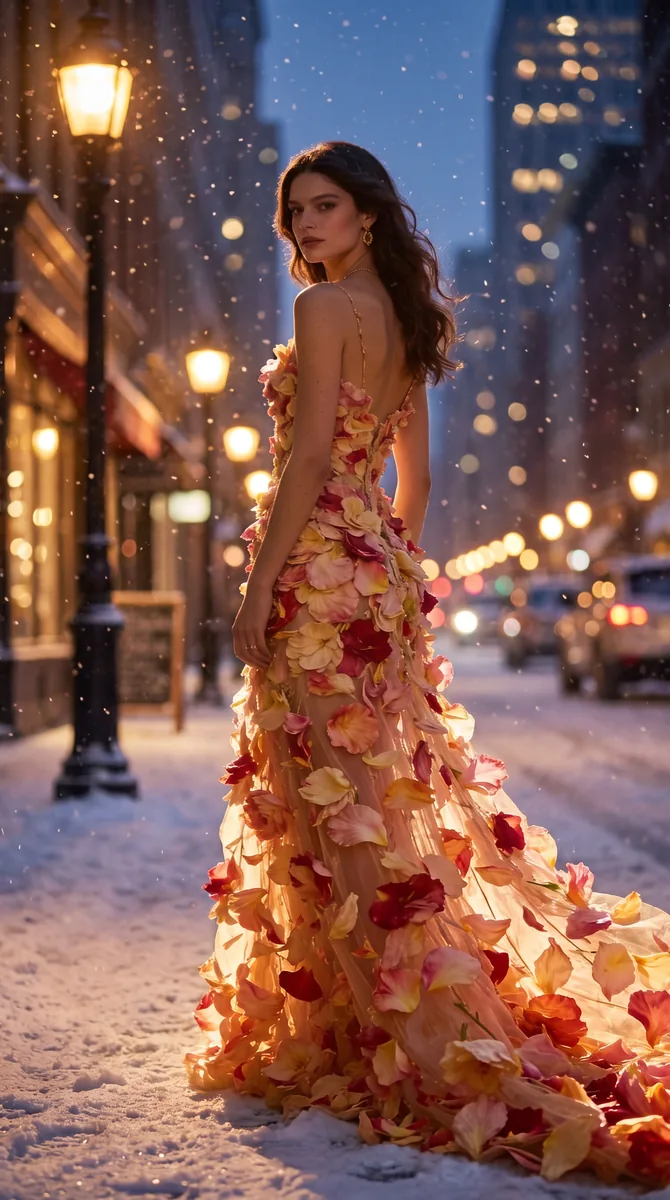
The face, the dress and the pose stayed, while the light on the girl became cold and nocturnal. That is why she looks like part of the new scene and not like a sticker on top.
Prompt:
Keep the woman exactly as in the photo: face, hair, the petal dress, pose and body proportions. Replace only the background with a snowy city street at night: soft falling snow, warm street lamps, glowing shop windows, blurred bokeh lights. Remove the floating petals and the garden. Adjust the light on the woman so it matches the new scene: cool blue night tones with warm light from the street lamps. Keep the original framing. 9:16
Prompt formula
What to keep + New background + Adjust the light + Format
- What to keep: face, hair, clothes, pose, proportions. For a product: shape, colour, logo, text.
- New background: specific, with the light and the time of day.
- Adjust the light: «adjust the light on the person to match the new background». This is exactly what removes the pasted-in look.
- Format: the same as the source, or the one the platform needs.
Ready prompts
Portrait in an autumn park:
Keep the person exactly as in the photo: face, hair, clothing, pose, body proportions. Replace only the background with a softly blurred city park in early autumn, warm afternoon light. Adjust the light and color on the person so it matches the new background and looks like one real photo. Keep the original framing.
Product on a white background (marketplace):
Keep the product exactly as in the photo: shape, color, logo, text, materials and proportions. Remove the background and place the product on a pure white seamless background, centered, with a soft natural contact shadow under it. Even studio lighting. 1:1
Remove extra objects:
Remove the person in the background on the right and the trash bin near the bench. Fill these areas naturally with the surrounding scenery. Do not change anything else in the photo.
Background for cutting out:
Keep the subject exactly unchanged. Place it on a solid pure white background with no shadow, no gradient and no props. Sharp, clean edges around the subject.
About a transparent background
Nano Banana Pro cannot create a real transparent background: if you ask for a «transparent background», the model will draw a white, black or checkered background. The working approach: generate the object on a pure white background without shadows (the prompt above) and cut it out in any editor or background removal service. This is how, for example, Telegram stickers are made.
For marketplaces
Change the surroundings, not the product: colour, shape and contents must match the real ones. More: product cards with AI, marketplace product images.
If the result is not right
- It looks pasted in. Add the light adjustment, describe the direction of light in the new background.
- The face or clothes changed. List everything to keep and do not change several things at once.
- The proportions changed. Add «keep body proportions and framing».
- The product changed. Add «shape, color, logo and text unchanged».
How much it costs
| Model | Resolution | Approximately |
|---|---|---|
| Nano Banana 2 | 1K | ~13 rubles |
| Nano Banana 2 | 2K | ~21 rubles |
| Nano Banana Pro | 2K | ~25 rubles |
| Nano Banana Pro | 4K | ~44 rubles |
Prices on KADR, October 2026. This is not a public offer. For portraits and products with text, use Pro; for simple backgrounds Nano Banana 2 is enough.
In short
A photo background is changed with AI in one prompt: what to keep, the new background, the light adjustment and the format. The light adjustment removes the pasted-in look. The model does not make a transparent background: generate on white and cut out separately. A background change on Nano Banana Pro costs about 25 rubles.